
Before going through a email verification toola simple glance may be enough to identify a invalid email address.
The method in brief
✅ Hover over the email address : A typo quickly occurred. A “gmial.com” instead of “gmail.com”, a “.con” instead of “.com”… In short, a small mistake can make the email address invalid.
✅ Examine the domain : A valid email address always has a recognized top-level domain (.com, .fr, .org, etc.). An unknown extension could indicate a suspicious address.
✅ Check the structure : A valid email always follows the same logic: [email protected]. If an “@” is missing or there are several dots in the wrong place, there is a problem.
Email address syntax
A valid email address must meet the following rules:
- It must be made up of two parts, separated by the @ sign (at): the local part, which corresponds to the user name and the domain part, which corresponds to the server name.
- Elle It must not contain spaces, accented characters or special charactersexcept for the period (.), hyphen (-), underscore (_), or plus sign (+).
- It must not begin or end with a period (.), hyphen (-), underscore (_), or plus sign (+).
- It must not contain two consecutive periods (.) or two at signs (@).
- Must have a maximum length of 254 characters.
| Valid Email Address | Invalid email address |
|---|---|
| [email protected] | julie.leroy@orange,fr |
Hover over the email address
The second piece of advice is to hover over the email address with the cursor, without clicking on itto see the actual link behind it.
This tip is useful for detecting fraudulent or malicious emailswho try to deceive you by using a fake email address, which resembles that of a trusted person or entity.
By hovering over the email address, you can check if the real link matches the displayed addressor if it links to a suspicious or dangerous site.
👉 Example
If you receive an email that appears to be from your bank, with an email address like [email protected], you can hover your cursor over this address and check whether the actual link is the same or whether it is different, like [email protected], which indicates a scam attempt.
Use Gmail to check an email
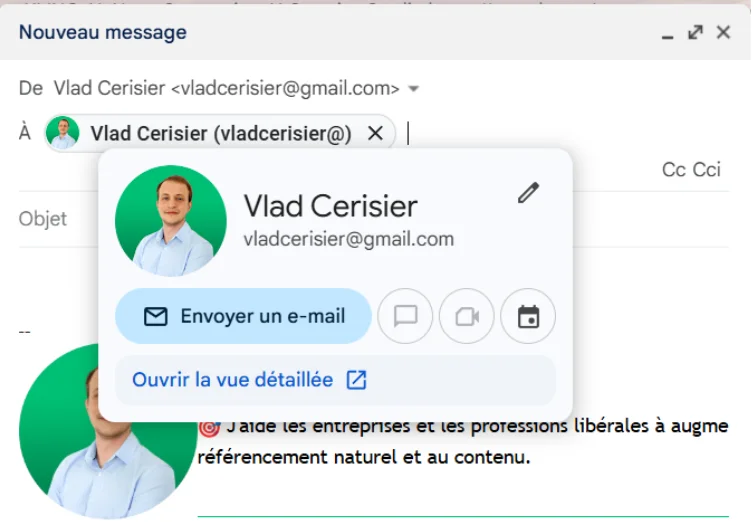
Gmail displays information for a valid email address.
- Go to your Gmail inbox
- Click “New Message”
- Type the email address and hover over it
➡️ Read also: How to add a Gmail icon to your desktop?
Google the email address
Type the email address into Google or another search engine.
You will be able to see:
- If it matches the person or entity you wish to contact.
- If it is not associated with suspicious or illegal activities (complaints, reports, etc.).
You will also be able to find useful information, such as name, name, profession, position, website, social networks, etc. of your interlocutor.
A true wealth of information from a simple email!
👉 Example
If you receive an email that appears to come from a recruiter, with an email address like [email protected], you can search for this address on Google and check if it corresponds to the company in question, if it is mentioned on its official website, if it has positive or negative reviews, etc.
Check the age of the email domain
This is to verify the date the server name was registered.
AND useful for detecting fraudulent or malicious emailswho often use recent domain names, created specifically for the occasion, and which have neither reputation nor credibility.
By checking the age of the email domain, you can get an idea of the reliability and legitimacy of your contact.
👉 Example
If you receive an email that appears to come from an administration, with an email address like [email protected], you can check the age of the impots.gouv.fr domain and see that it was registered in 1997, which indicates some seniority and authority.
Use an email verification tool
If manual verification isn’t enough, they exist email address validation tools capable of automatically analyzing whether an email is active or not.
How do these tools work?
These online services, free or paidallow you to verify the validity of an email address by automatically carrying out various tests:
- Syntactic validation: They check whether the email address follows the format rules.
- Domain Analysis: They make sure that the email domain exists and is active.
- Server Test: Some tools simulate sending a message to see if the valid email address responds.
- Try SMTP
So, with a good email checking tool, no more fake addresses! They are also useful for verifying the validity of a questionable email address that does not respond to other suggestions.
The best email verification tools
| Tool | Prices |
| Mailnjoy | Free trial €4 / 1000 credits |
| Captain Check | Starting from €7 for 1000 verifications or €0.0070 per verification. |
| Hunter.io Find Email | 25 free searches/month then packages from €34/month |
| ZeroBounce Email Validation | 100 free checks/month $18 credit purchase |
| MailTester (anti-spam test) |
These services are especially useful as part of an email campaign. They allow you to clean an email list and improve the validity of email addresses before sending.
Are email address verification tools reliable?
Yes, these tools are reliable and can significantly improve the performance of your campaigns.
The benefits of email address verification
1. Improve email deliverability
A good deliverability rate is the foundation of a successful email marketing campaign.
The “cleaner” your email address base is, the more your messages reach their destination.
Logic.
Conversely, a database containing too many invalid addresses can result in:
❌ Sending to non-existent mailboxes (which increases “bounces”)
❌ Risk of being classified as spam by email providers
❌ A drop in the reputation of your sending domain
👉 A simple run through an email verification tool can eliminate these issues before sending.
2. Reduce the risk of blacklisting
Email providers (Gmail, Outlook, Yahoo, etc.) monitor the quality of sendings.
If you send too many emails that get bounced or marked as spam, your domain may be penalized.
By checking your email lists, you:
✔️ Reduce the number of invalid addresses in your database
✔️ Reduce sending errors (hardbounce)
✔️ Protect your reputation and avoid being blocked
3. Optimize the performance of marketing campaigns
Sending emails to valid addresses means your messages reach real recipients, increasing your chances of engagement.
With a clean, clean base, you get:
✔️ A better open rate of e-mail
✔️ Improved click-through rate on your offers
✔️ More reliable statistics to adapt your strategies
Fewer invalid emails = improved ROI!
➡️ Read also: 5 tips to improve your email campaigns
4. Safe exchanges and avoid fraud
Some fraudulent email addresses are used spam, phishing or scams. Verifying your email address avoids these types of risks before interacting with an unknown contact.
✔️ Check the domain to make sure it is legitimate
✔️ Detection of temporary addresses often used for questionable practices
✔️ Protection against fake addresses created to deceive
Frequently asked questions
Latest posts
Traditional vs digital advertising in 2026: which one to choose?

Duplicate Content: A Problem for Your Natural Referencing?
SEO Forums: The Complete List [2026]
How to build a successful linking strategy?

5 tips for successful marketing based on storytelling

Instagram profile photo: the practical guide [+Outils]

Twitter: 7 strategies to stand out

How to increase your awareness using digital?

Why premium domains improve your customer acquisition cost (CAC)